Infrastructure as Code Project

Terraform as a Construction Manager

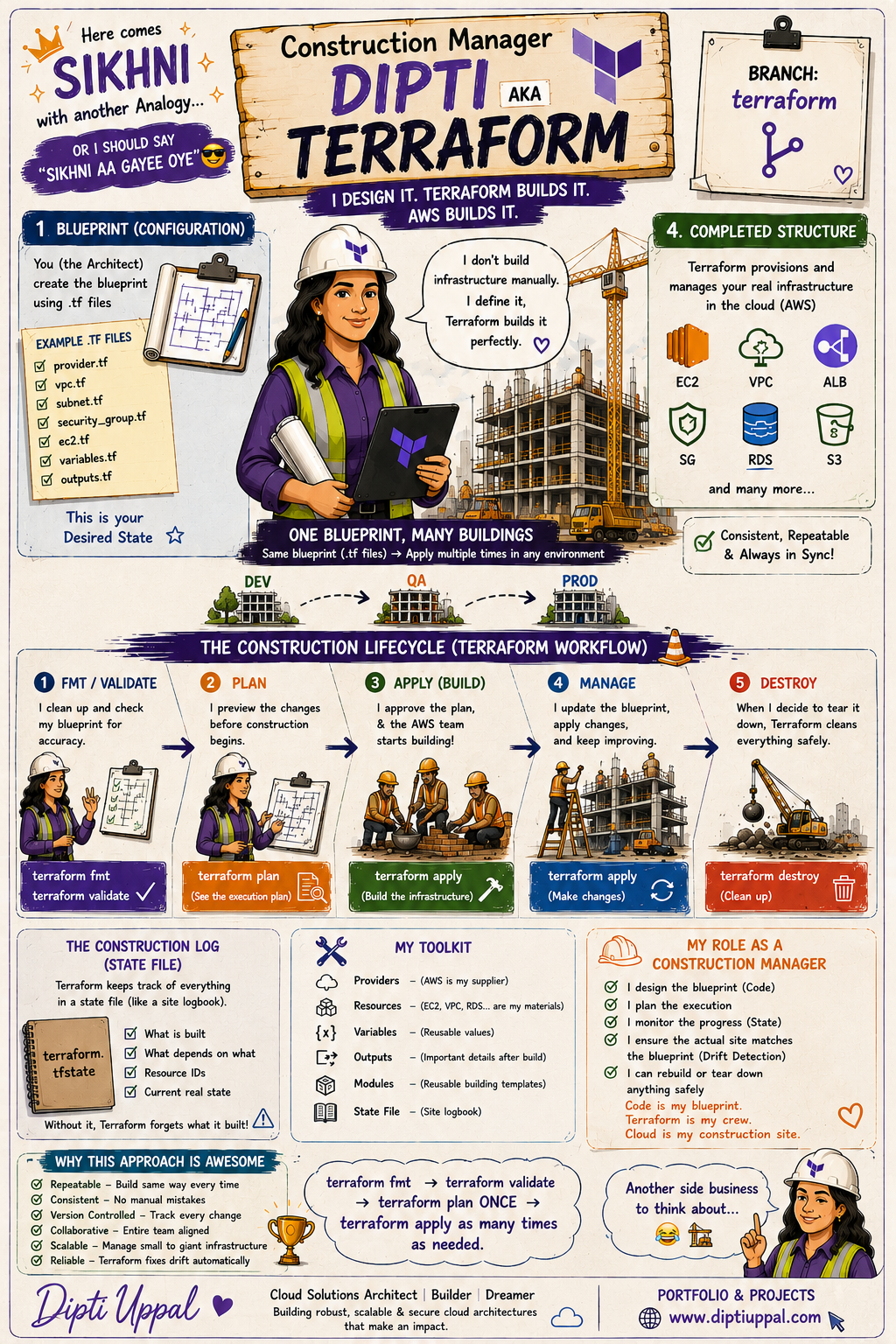
In this project, I used Terraform to define and manage AWS infrastructure through reusable configuration files. Just as a construction manager uses a blueprint to build consistent structures, Terraform uses .tf files to provision consistent cloud environments.

Visual Learning

Construction Manager Dipti, AKA Terraform

This infographic explains the Terraform lifecycle through a practical construction-site analogy.

Terraform construction manager infographic by Dipti Uppal
One blueprint, many environments: Development, QA, UAT and Production.
Terraform Overview

What is Terraform?

Terraform is an Infrastructure as Code tool created by HashiCorp. It allows infrastructure to be defined, reviewed, version-controlled and provisioned through code.

Infrastructure as Code

Instead of manually creating resources through the AWS Management Console, Terraform allows engineers to define resources such as VPCs, subnets, EC2 instances, security groups, load balancers, databases and EKS clusters in configuration files.

Desired state: The Terraform configuration describes what the infrastructure should look like.

Why organizations use it

  • Infrastructure becomes repeatable and consistent.
  • Manual configuration errors are reduced.
  • Changes can be reviewed before they are applied.
  • Infrastructure code can be stored in Git.
  • Development and production environments can use the same design.
  • Cloud resources can be created and removed through automation.
Terraform Lifecycle

From Blueprint to Infrastructure

Terraform follows a predictable workflow that helps engineers validate, review and safely provision cloud infrastructure.

1

Format

Formats Terraform configuration files into a consistent and readable structure.

terraform fmt
2

Validate

Checks the configuration for syntax and structural errors.

terraform validate
3

Plan

Generates a preview of the resources Terraform intends to create, update or destroy.

terraform plan
4

Apply

Executes the approved plan and provisions the required infrastructure.

terraform apply
5

Destroy

Safely removes the resources managed by the Terraform configuration.

terraform destroy
Project Architecture

AWS Infrastructure Managed by Terraform

The configuration can create interconnected AWS resources while Terraform automatically determines their dependency order.

πŸ“ Terraform Files

Desired infrastructure

β†’
☁️ AWS Provider

Connects Terraform to AWS

β†’
🌐 VPC and Subnets

Networking foundation

β†’
πŸ›‘οΈ Security Group

Traffic control

β†’
πŸ–₯️ EC2 Instance

Application compute

Business and Technical Value

Benefits of Terraform

Terraform improves reliability, repeatability and collaboration throughout the infrastructure lifecycle.

πŸ”

Repeatability

The same configuration can be used to create consistent infrastructure across multiple environments.

βœ…

Consistency

Resources are created from tested definitions rather than different manual console steps.

πŸ“‚

Version Control

Terraform files can be stored in Git, reviewed through pull requests and tracked over time.

🀝

Collaboration

Teams can share modules, review proposed changes and maintain a common infrastructure design.

πŸ“ˆ

Scalability

Terraform can manage a few resources or large, interconnected cloud environments.

πŸ”

Drift Detection

Terraform can identify differences between the desired configuration and the actual cloud infrastructure.

Practical Applications

Common Terraform Use Cases

Terraform can support cloud provisioning, application modernization, DevOps automation and enterprise platform management.

☁️

Cloud Infrastructure Provisioning

Create VPCs, subnets, route tables, gateways, EC2 instances, load balancers, databases and storage.

🏒

Multiple Environments

Use reusable Terraform code to provision Development, QA, UAT and Production environments consistently.

☸️

Kubernetes Infrastructure

Provision Amazon EKS clusters, managed node groups, IAM roles and supporting networking components.

πŸš€

CI/CD Automation

Integrate Terraform into deployment pipelines to review and provision infrastructure automatically.

🧩

Reusable Modules

Package frequently used infrastructure patterns into reusable modules for different teams and applications.

🌍

Multi-Cloud Management

Use different Terraform providers to manage AWS, Azure, Google Cloud, Kubernetes, GitHub and other platforms.

Terraform CLI

Common Terraform Commands

These commands support the complete Terraform lifecycle, from initialization and validation to deployment and cleanup.

Command Purpose Typical Use
terraform init Initializes the working directory and downloads the required providers and modules. Run when starting a project or after changing providers, modules or backend configuration.
terraform fmt Formats Terraform configuration files. Run before committing Terraform code to Git.
terraform validate Validates Terraform syntax and configuration structure. Used to find configuration errors before planning.
terraform plan Displays the proposed infrastructure changes. Review resources that will be added, changed or destroyed.
terraform apply Executes the proposed infrastructure changes. Creates, updates or removes cloud resources.
terraform show Displays the current state or a saved execution plan. Inspect details about Terraform-managed resources.
terraform output Displays values declared in output blocks. Retrieve public IP addresses, DNS names, resource IDs and other useful values.
terraform state list Lists the resources currently tracked in Terraform state. Review which resources are under Terraform management.
terraform refresh Updates Terraform's state information based on the real infrastructure. Historically used to synchronize state; modern plan and apply operations normally perform refresh automatically.
terraform destroy Removes all resources managed by the current Terraform configuration. Clean up learning environments and temporary infrastructure.
Terraform Memory

Understanding Terraform State

Terraform state maps resources defined in configuration files to the real resources created in the cloud.

What does the state file track?

  • Cloud resource IDs
  • Resource attributes
  • Dependencies between resources
  • Terraform logical names
  • The current known infrastructure state
Important: Terraform state may contain sensitive infrastructure information. It should not be committed to a public GitHub repository.
{
  "type": "aws_instance",
  "name": "web_server",
  "attributes": {
    "id": "i-0123456789abcdef0",
    "instance_type": "t3.micro",
    "private_ip": "10.0.1.25",
    "tags": {
      "Name": "Terraform-EC2"
    }
  }
}
One Blueprint, Many Buildings

Reusable Infrastructure Across Environments

A tested Terraform design can be reused with different variable values to create similar infrastructure for multiple environments.

Example environments

  • Development
  • Quality Assurance
  • User Acceptance Testing
  • Production

What may change?

  • Instance sizes
  • Number of resources
  • CIDR ranges
  • Environment tags
  • Scaling capacity
  • Application configuration

What I Learned

  • How Terraform providers connect configuration files to cloud platforms such as AWS.
  • How resource references create implicit dependencies.
  • How Terraform builds a dependency graph and creates independent resources in parallel.
  • How terraform plan previews infrastructure changes before deployment.
  • How Terraform state maps configuration resources to real AWS resources.
  • How configuration drift occurs when resources are changed outside Terraform.
  • How terraform destroy safely removes resources and keeps state synchronized.