Kubernetes Cluster Successfully Deployed

Full-Stack Application Orchestrated with Kubernetes

Designed and deployed a containerized React and Spring Boot application on Amazon EKS. Docker images were stored in Amazon ECR, Kubernetes Deployments maintained the desired pod state, Services enabled communication, and an AWS Load Balancer exposed the application.

Amazon EKS Kubernetes Docker Amazon ECR React Spring Boot AWS Load Balancer
● Cluster Healthy
Amazon EKS Cluster Desired State: 4 Pods

Worker Node 01

React
Pod
Spring Boot
Pod

Worker Node 02

React
Pod
Spring Boot
Pod
Kubernetes Services → Stable Networking and Traffic Routing
2Worker Nodes
4Application Pods
100%Desired State
01 · Project Overview

From container images to a self-healing application platform

This project demonstrates the complete flow of packaging, storing, orchestrating, exposing, and operating a modern full-stack application with Docker, Amazon ECR, Kubernetes, and Amazon EKS.

Business and Technical Goal

Deploy the frontend and backend as independently managed workloads while improving availability, repeatability, scalability, and operational control compared with manually running containers.

  • Containerized the React frontend and Spring Boot backend.
  • Pushed versioned application images to Amazon ECR.
  • Created an Amazon EKS cluster with managed worker nodes.
  • Defined desired application state using Kubernetes YAML files.
  • Exposed the frontend through an AWS provisioned load balancer.
My Role

I designed the architecture, prepared Docker images, configured AWS resources, authored the Kubernetes manifests, deployed the workloads, tested application connectivity, and documented the complete implementation and troubleshooting process.

  • Architecture and service selection
  • Docker image lifecycle management
  • Kubernetes deployment and service configuration
  • Testing, validation, and cleanup
02 · Technology Stack

Services and tools used

Each component had a specific responsibility within the application delivery and orchestration workflow.

K8s

Kubernetes

Managed the desired state, pod placement, service discovery, scaling, and self-healing.

EKS

Amazon EKS

Provided the AWS-managed Kubernetes control plane and integration with AWS infrastructure.

ECR

Amazon ECR

Stored and distributed the Docker images used by the Kubernetes Deployments.

DKR

Docker

Packaged the frontend, backend, runtime, libraries, and dependencies into portable images.

UI

React

Delivered the browser-based user interface for the AWS Architecture Recommendation Engine.

API

Spring Boot

Implemented REST APIs, application logic, request handling, and backend processing.

ALB

AWS Load Balancer

Provided a public endpoint and routed incoming traffic to the Kubernetes frontend service.

CLI

kubectl and AWS CLI

Configured cluster access, applied manifests, inspected resources, and validated deployment health.

03 · Architecture

End-to-end request and deployment flow

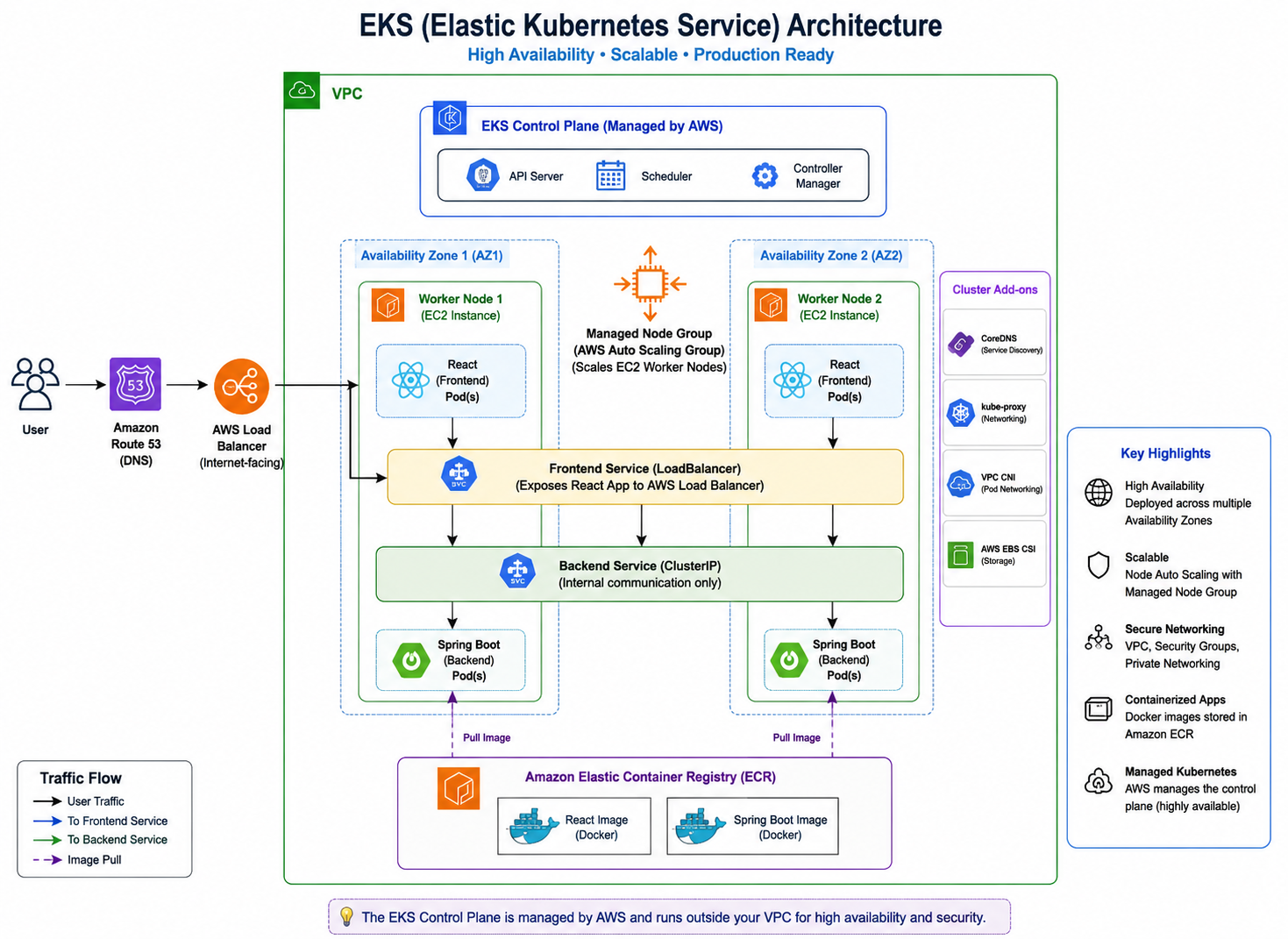
The browser reaches the AWS load balancer, which sends traffic to the frontend Kubernetes Service. The React application communicates with the backend Service, and Kubernetes routes requests to healthy Spring Boot pods.

👤 User Web browser
⚖️ AWS Load Balancer Public entry point
🌐 Frontend Service Routes to React pods
⚙️ Backend Service Routes to API pods

Deployments continuously maintain the requested replicas, while Services provide stable endpoints even when individual pods are replaced.

Amazon EKS Kubernetes project architecture designed by Dipti Uppal
04 · Kubernetes Manifests

Declarative application configuration

The YAML files describe what should run, how many replicas should exist, which images should be used, and how network traffic should reach the workloads.

Deployment

frontend-deployment.yaml

Defines the React container image, replicas, container port, pod labels, and rolling update behavior.

kubectl apply -f frontend-deployment.yaml
Service

frontend-service.yaml

Selects the frontend pods and exposes the user interface through a Kubernetes LoadBalancer service.

kubectl apply -f frontend-service.yaml
Deployment

backend-deployment.yaml

Defines the Spring Boot image, replica count, API container port, health expectations, and pod labels.

kubectl apply -f backend-deployment.yaml
Service

backend-service.yaml

Creates a stable internal endpoint and routes frontend API calls to healthy Spring Boot pods.

kubectl apply -f backend-service.yaml
05 · Deployment Workflow

How the application reached Amazon EKS

The implementation followed a repeatable sequence from source code to container registry, cluster deployment, external access, and validation.

1

Build the application

Prepared the React frontend and Spring Boot backend source code and verified both applications locally.

2

Create Docker images

Used separate Dockerfiles to package each application with its required runtime and dependencies.

3

Push images to Amazon ECR

Authenticated Docker with AWS, tagged the images, and pushed them to private ECR repositories.

4

Create the Amazon EKS cluster

Provisioned the managed Kubernetes control plane and configured a managed node group for worker capacity.

5

Apply Kubernetes manifests

Used kubectl to create the frontend and backend Deployments and Services from the YAML definitions.

6

Validate pods and services

Checked pod status, node placement, service endpoints, external address assignment, and application connectivity.

7

Test resilience and clean up

Observed Kubernetes desired-state management and removed the AWS resources after documentation to control cost.

06 · Implementation Evidence

Project screenshots

Add the screenshots you captured from the application, Amazon ECR, Amazon EKS, EC2 worker nodes, Kubernetes resources, and the AWS load balancer.

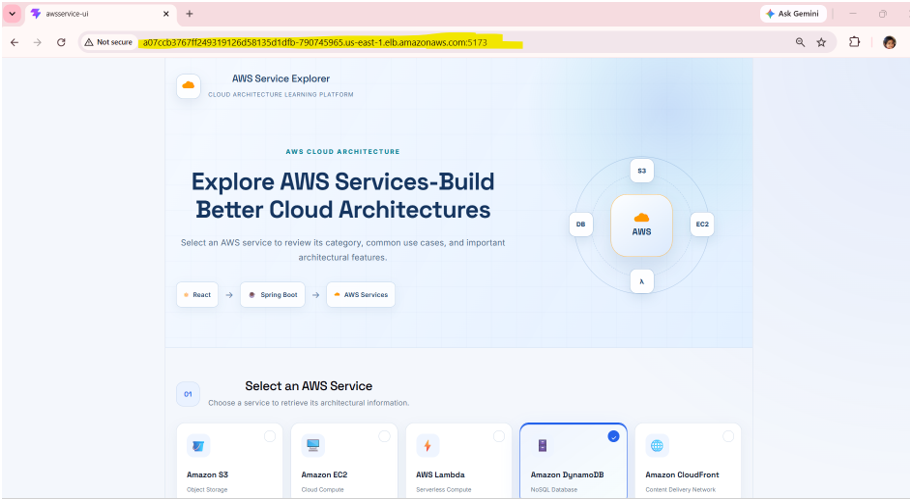
Kubernetes application running in browser

Live Application

React and Spring Boot application accessed through the external load balancer.

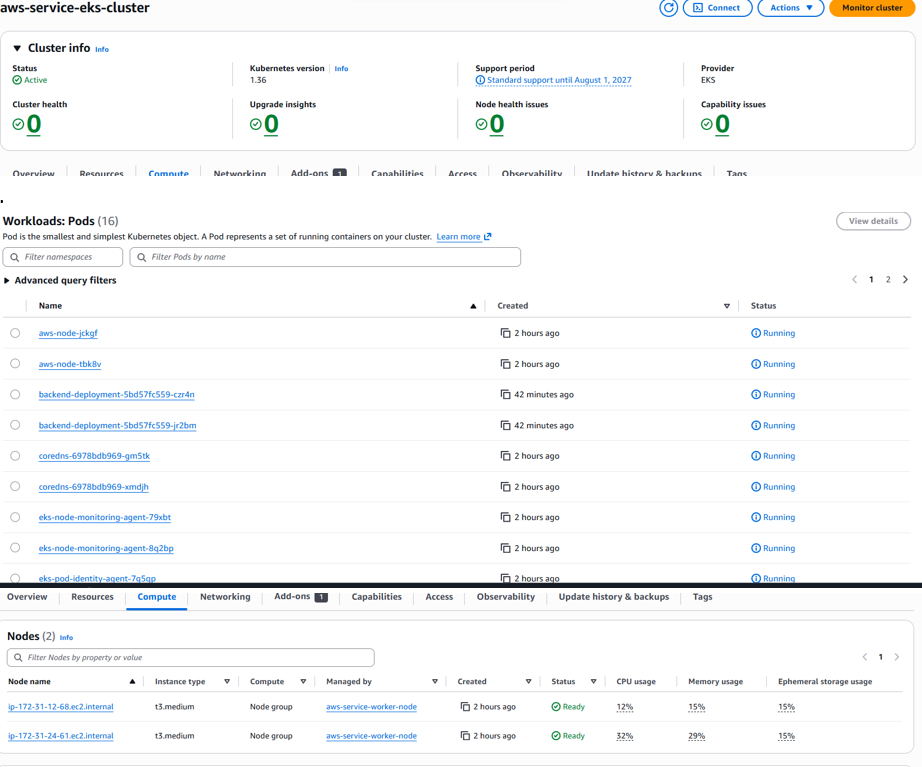
Amazon EKS cluster screenshot

Amazon EKS Cluster

Managed Kubernetes control plane and cluster configuration in AWS.

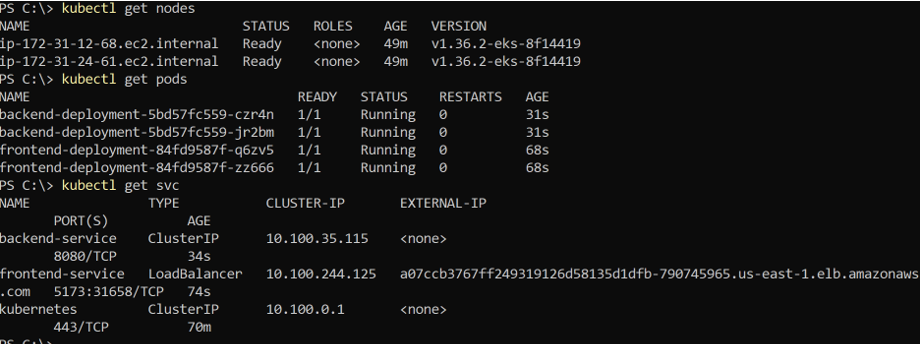
Kubernetes pods and services

Pods and Services

Validated running workloads, replica state, and Kubernetes networking.

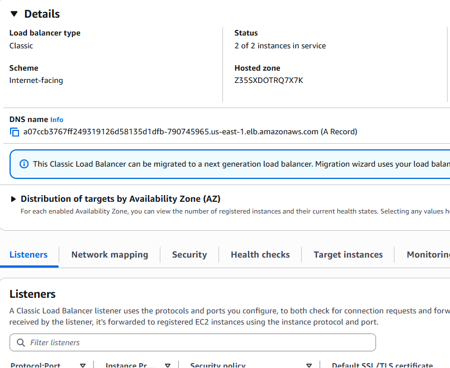
AWS load balancer for Kubernetes service

AWS Load Balancer

Public entry point provisioned for the frontend LoadBalancer service.

07 · Key Learnings

Architecture and operational skills gained

The project connected application development, containerization, Kubernetes orchestration, AWS networking, and production-oriented operations.

01

Desired State Management

Understood how Deployments maintain replicas and replace failed pods automatically.

02

Pod and Image Relationship

Applied the distinction between an immutable Docker image and a running pod created from that image.

03

Stable Service Networking

Used Services and selectors to route traffic to dynamic pods through stable endpoints.

04

Cluster Responsibilities

Learned how the control plane, scheduler, kubelet, nodes, and pods work together.

05

AWS Integration

Connected EKS, ECR, EC2 worker nodes, IAM permissions, and AWS load balancing.

06

Cost-Aware Cleanup

Documented resources and removed the cluster, nodes, target groups, and load balancers after testing.

Project Resources

Review the complete implementation

Explore the detailed documentation, Kubernetes YAML files, application source code, deployment evidence, architecture decisions, and troubleshooting notes.